ZeroTier API Tokens
Access to the ZeroTier APIs requires an authentication token. This guide describes the different types of tokens available and how to create and manage them.
- New Central
- Legacy Central
- Client
Service Accounts and API Tokens
Service Accounts and the New Central API are available to New Central customers on an Essential plan or above. For pricing information, see the Pricing page on our website.
Service accounts are neutral administrator accounts designed for API access and automation. They are not tied to any individual user's account, making them ideal for continuous integration, infrastructure-as-code deployments, and other automated workflows.
What are Service Accounts?
Service accounts provide a dedicated identity for programmatic access to the New Central API. Key features include:
- Independent from user accounts - Service accounts persist even when team members change
- Administrator privileges - Currently, service accounts have blanket administrator access to the organization
- Multiple API tokens - Each service account can have one or more API tokens
- Customizable expiry - Set custom expiration dates for API tokens to enhance security
- Centralized management - View and manage all service accounts from the Organization settings
For complete API documentation, see the New Central API Reference.
Creating a Service Account
To create a service account in New Central:
- Navigate to your Organization
- Select the Service Accounts tab
- Click the Add Service Account button
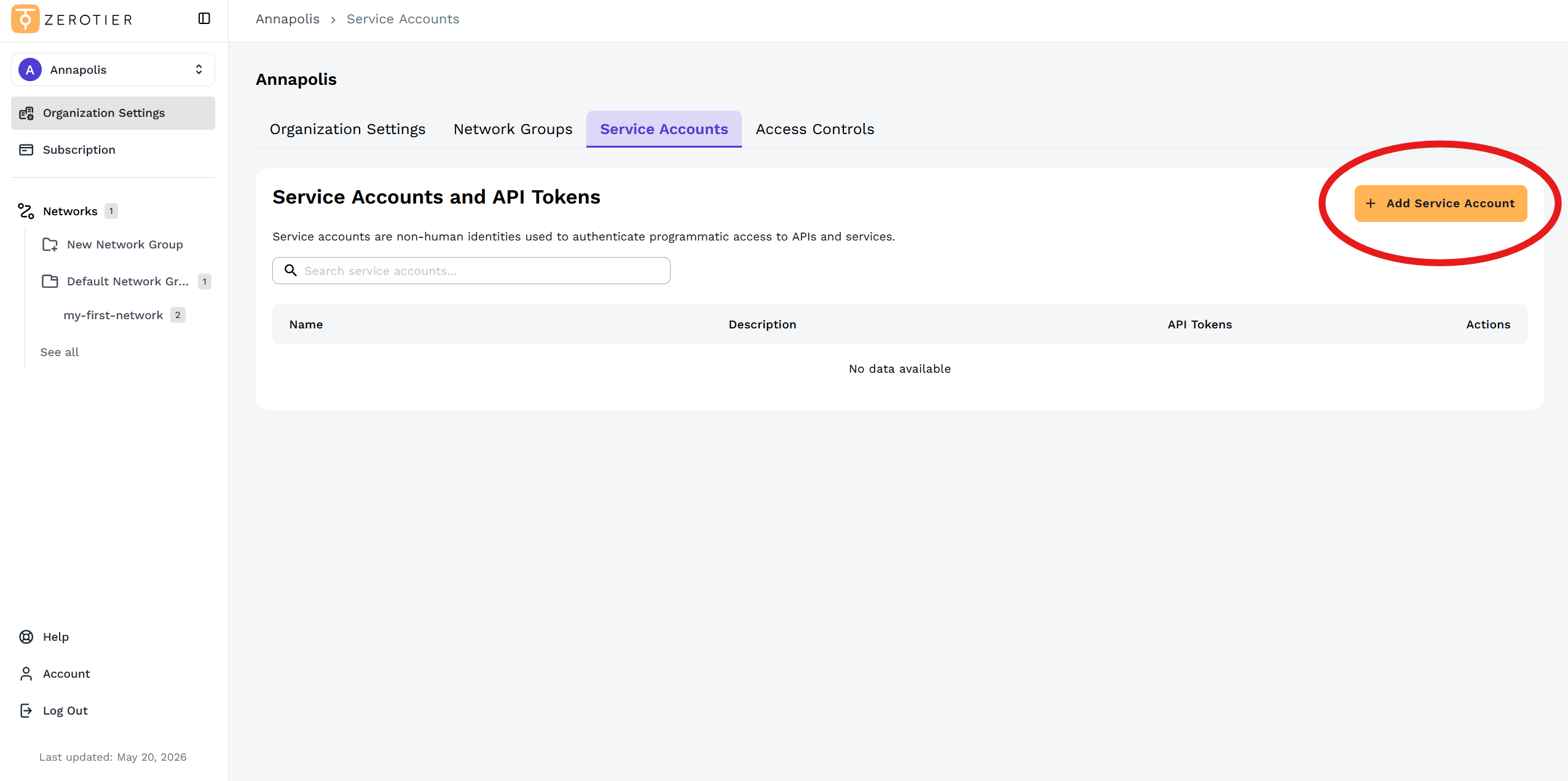
- Enter a Name and Description for the service account
- The service account will be automatically created and assigned a unique identifier in the format
service-account@org-[orgid].ztsa
Generating API Tokens
Each service account needs at least one API token to authenticate with the New Central API.
To create an API token:
- After creating the service account, you'll see the Assign API Tokens section
- Enter a Token name to identify the token's purpose
- Set an Expiration Date - Choose when this token should expire for enhanced security
- Click Generate API Token
While you can set any expiration date, creating long-lasting tokens (e.g., years in the future) is a security risk. If a token is compromised, it remains valid until expiration or unless revoked. Best practice is to set shorter expiration periods and rotate tokens regularly.
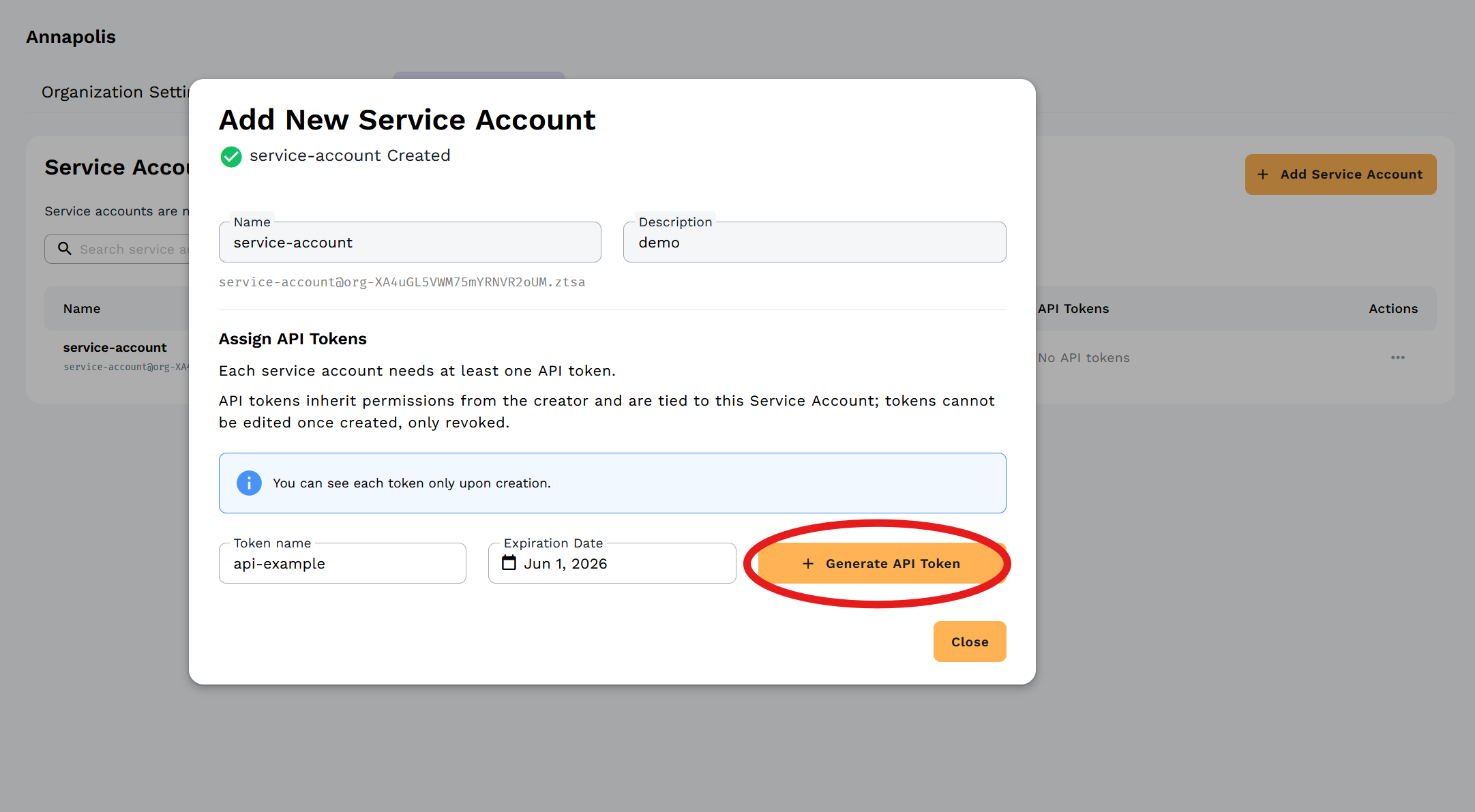
The API token is displayed only once upon creation. Copy and securely store the token before closing the dialog. You will not be able to view it again.
Managing Service Accounts
Service accounts appear in your Organization's Access Controls tab alongside regular user accounts, identified by their service account icon and email format.
To manage an existing service account:
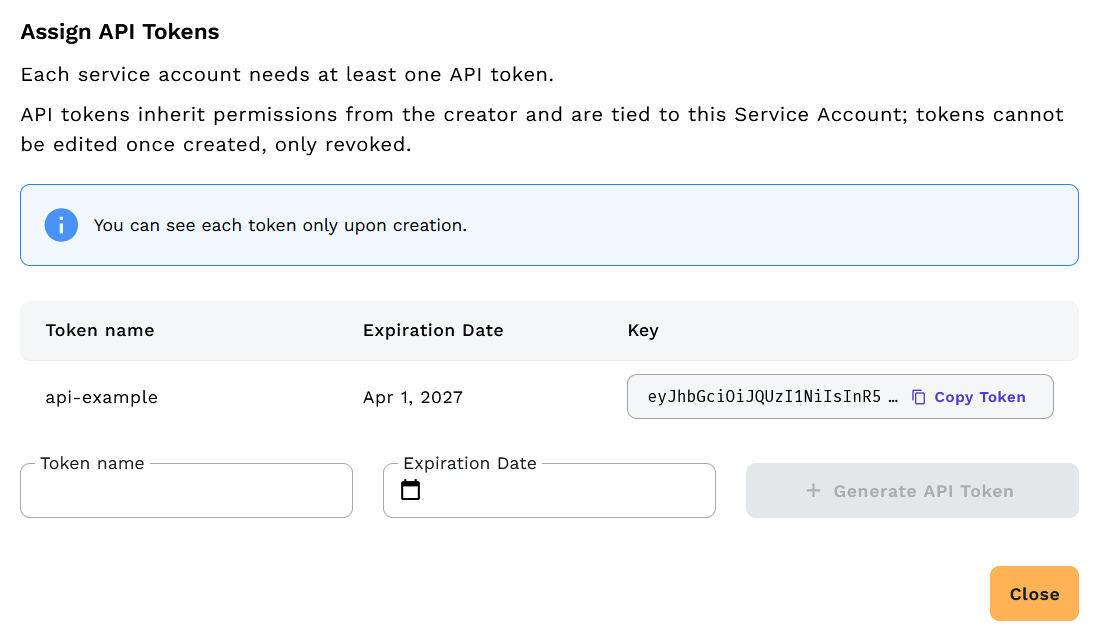
- Navigate to the Service Accounts tab
- Click the three-dot menu (⋮) in the Actions column for the service account
Available actions:
- Edit Service Account - Update name, description, and manage API tokens
- Manage Tokens - View, rename, and delete existing API tokens
- Delete Service Account - Permanently remove the service account and revoke all associated tokens
Viewing and Managing Tokens
When editing a service account, you can view all API tokens associated with it:
- Token name - The descriptive name you assigned
- Expiry Date - When the token will expire
- Last Used - Timestamp of the token's most recent use
- Actions - Edit or delete individual tokens
Rotate API tokens regularly by creating new tokens with expiry dates and deleting old ones. This limits the potential impact of a compromised token.
Using Service Account Tokens
Service account API tokens work with the New Central API just like personal API tokens:
# List networks using a service account token
curl -H "Authorization: Bearer YOUR_API_KEY" \
  "https://central.zerotier.com/api/v2/network?org-id=YOUR_ORG_ID"
See the New Central API Reference for complete API documentation.
Security Best Practices
- Use descriptive names - Clearly identify what each service account and token is used for
- Set expiration dates - Don't create tokens that never expire
- Rotate regularly - Create new tokens and delete old ones periodically
- Limit scope - Create separate service accounts for different automation tasks when possible
- Store securely - Use secret management tools (HashiCorp Vault, AWS Secrets Manager, etc.) to store tokens
- Monitor usage - Check the "Last Used" timestamp to identify unused tokens that can be deleted
Legacy Central API Token
To use the Legacy Central API, you need a personal API token associated with your account.
To create a token:
- Log into my.zerotier.com
- Navigate to the Account tab
- Scroll to the API Access Tokens section
- Click Generate New Token
- Enter a memorable name that shows the intended use (e.g., "Terraform automation token" or "internal dev key")
- Click Generate

Each token you create is associated with your user account, so it will allow the same level of access to manage and query networks that you have when working in the Legacy Central UI.
The token is displayed only once at the time you create it. Save it somewhere safe before clicking 'Done'.
Using your token:
# Example API request
curl -H "Authorization: token YOUR_LEGACY_CENTRAL_TOKEN" \
  https://api.zerotier.com/api/v1/network
See the Legacy Central API Reference for more information.
ZeroTierOne Local Service Token
The local service API token is stored in the authtoken.secret file in the ZeroTier service state directory. You'll need it to make API calls to the ZeroTier service running on your local machine.
ZeroTier generates the token at random the first time it starts. If you delete the file and restart the ZeroTierOne service, a new token will be created, and the existing token will no longer be usable to access the API.
Finding Your Service Token
You can store the current auth token value in an environment variable for use in scripting and local development using the following terminal commands:
- Linux
- macOS
- Windows
TOKEN=$(sudo cat /var/lib/zerotier-one/authtoken.secret)
TOKEN=$(sudo cat "/Library/Application Support/ZeroTier/One/authtoken.secret")
$env.TOKEN = Get-Content C:\ProgramData\ZeroTier\One\authtoken.secret
Using the Service Token
The service token is used to authenticate requests to the local ZeroTier service API at http://localhost:9993:
# Example: List joined networks
curl -H "X-ZT1-Auth: $TOKEN" \
  http://localhost:9993/network
See the Client API Reference for complete documentation.