Web Hooks
Webhooks allow you to receive real-time notifications about events in your ZeroTier organization. Configure webhooks to monitor network changes, member activity, organization updates, and more.
- New Central
- Legacy Central
Configuring Webhooks
Webhooks allow you to receive real-time notifications about events in your organization.
Accessing Webhooks
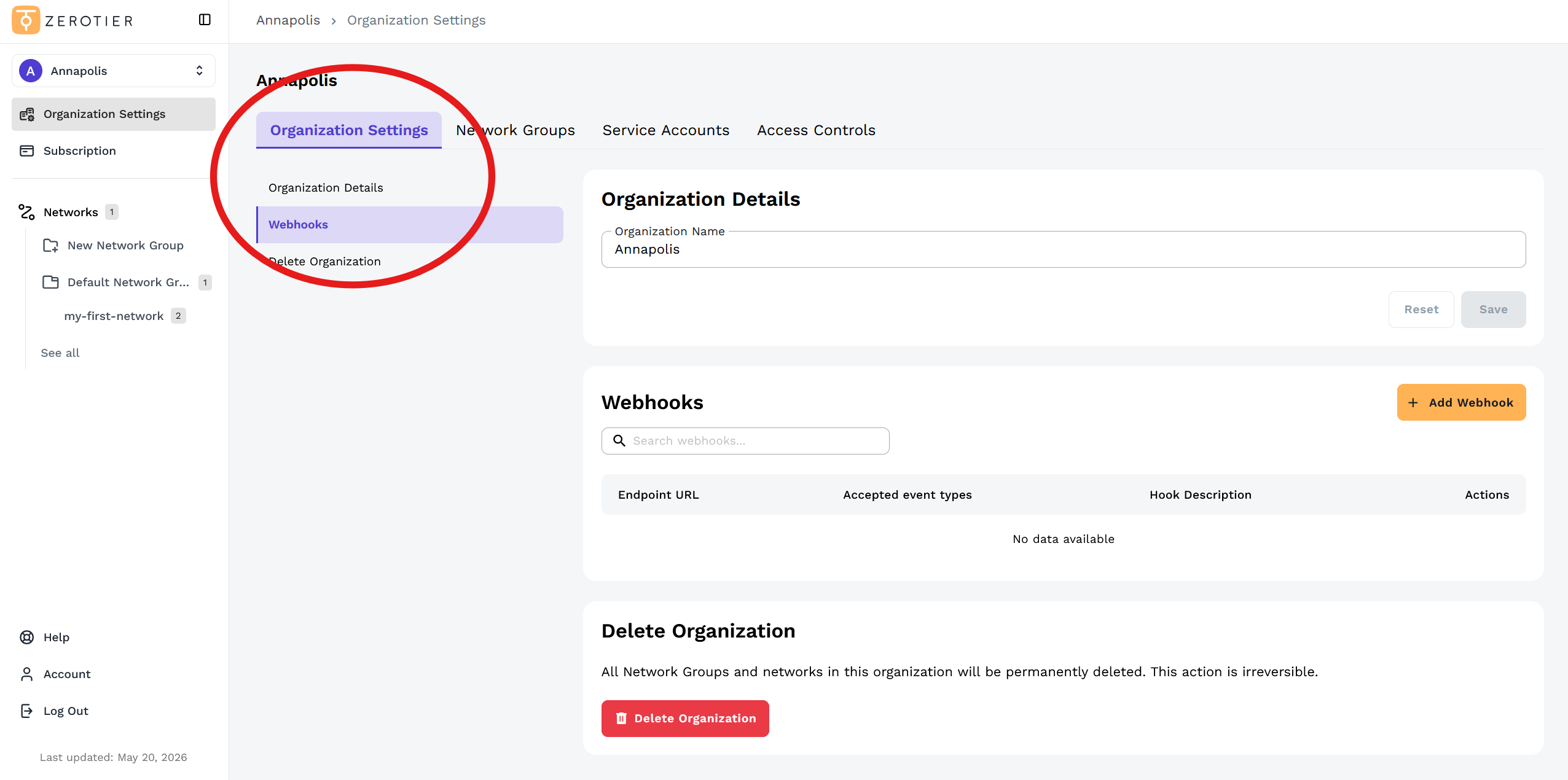
- Click Organization Settings in the left sidebar
- Click on the Webhooks section in the left menu or scroll down to the Webhooks section
Adding a Webhook
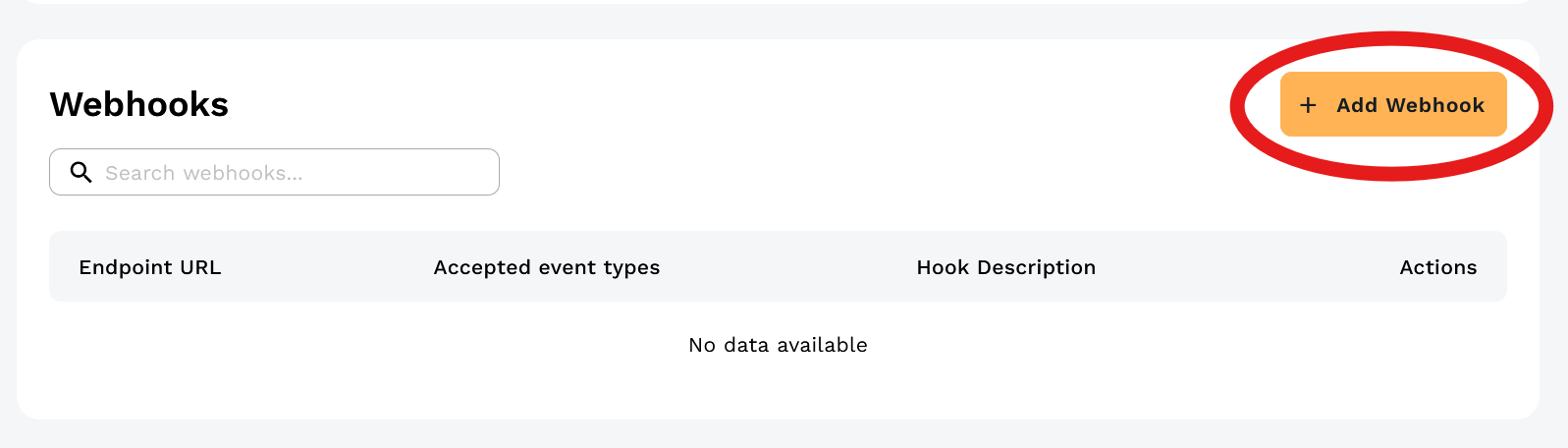
Click the Add Webhook button:
In the Add New Webhook dialog, configure your webhook:
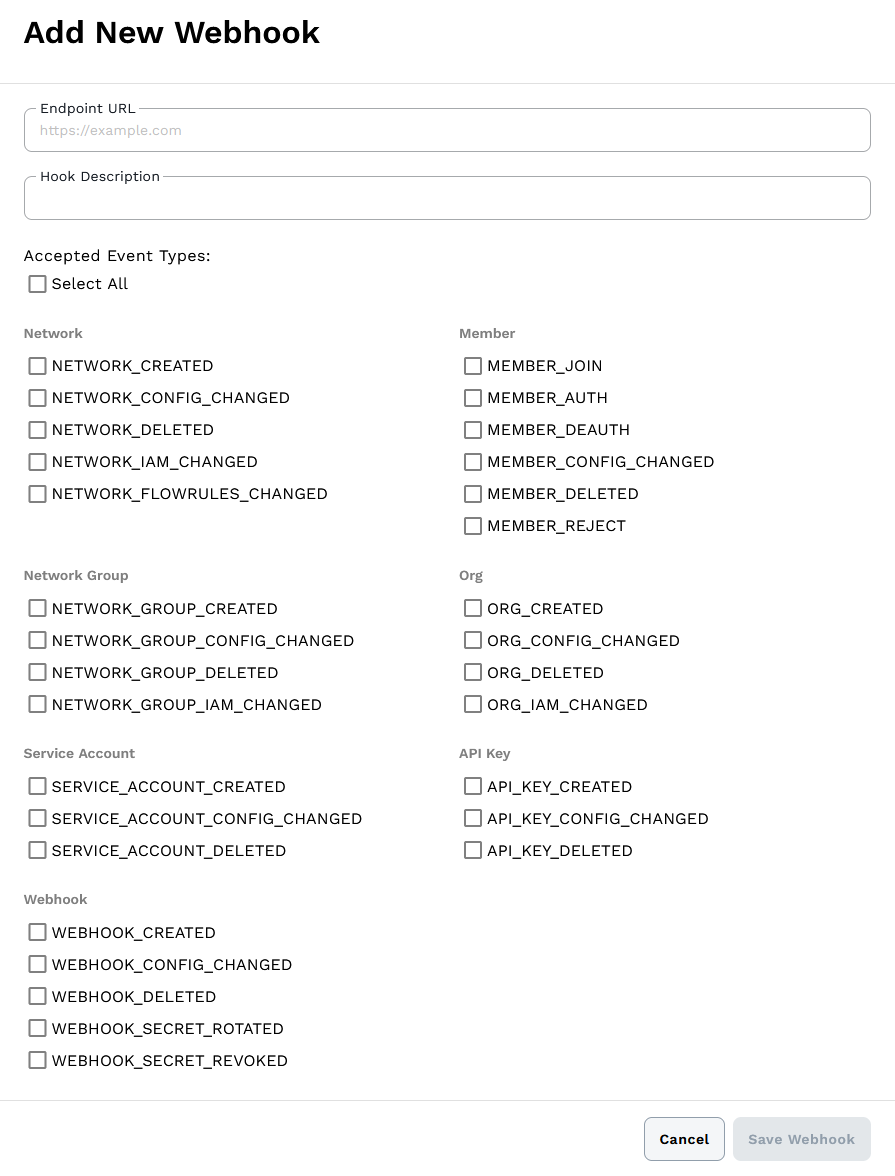
- Endpoint URL - The HTTPS endpoint that will receive webhook events. Must be a fully-qualified domain name (raw IP addresses are not allowed) and cannot resolve to private or internal IP ranges.
- Hook Description - Optional description to identify the webhook's purpose.
- Accepted Event Types - Choose which events to receive for this webhook. You can select from Network, Member, Network Group, Organization, Service Account, API Key, and Webhook events, or use Select All to subscribe to all events.
You may create multiple webhooks targeting different endpoints with different event subscriptions depending on your needs. For complete details on webhook configuration and events, see the New Central API Webhooks reference.
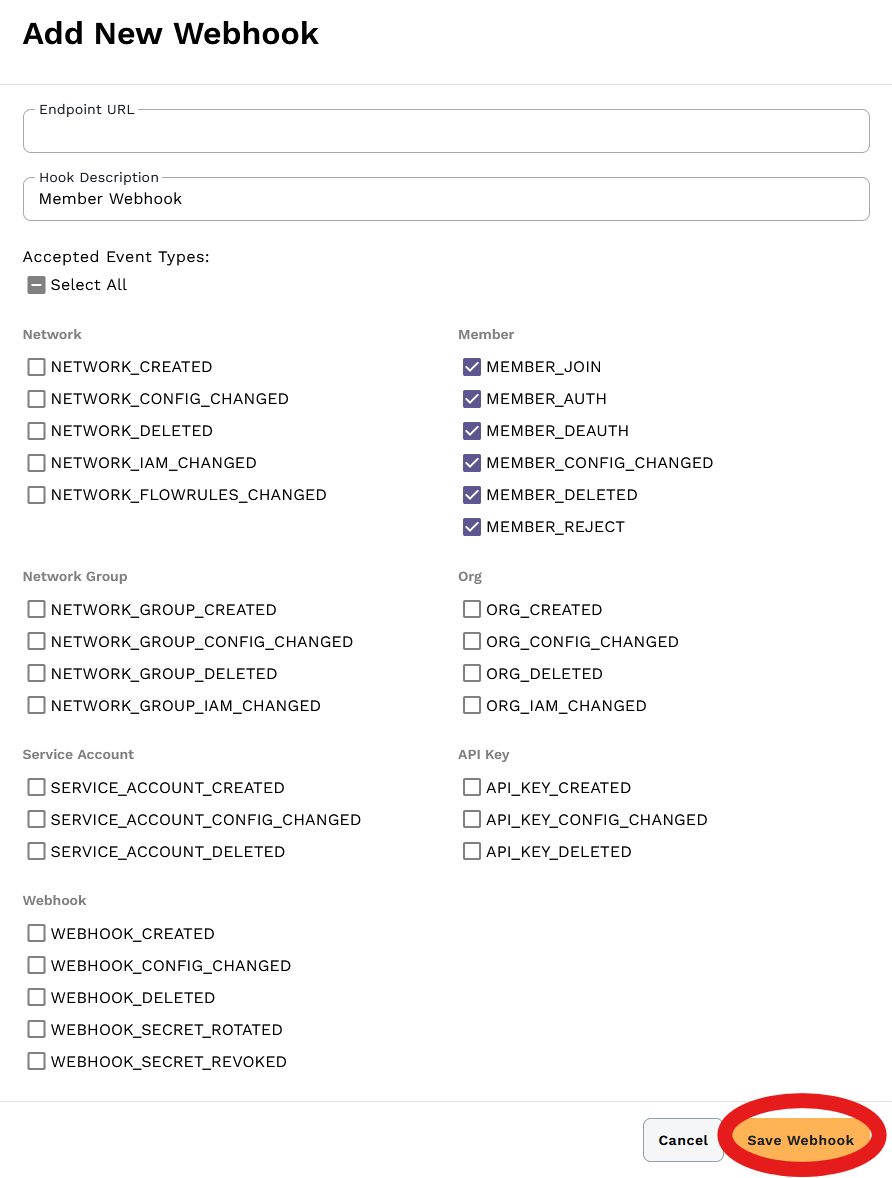
Click Save Webhook to create the webhook.
Managing Webhooks
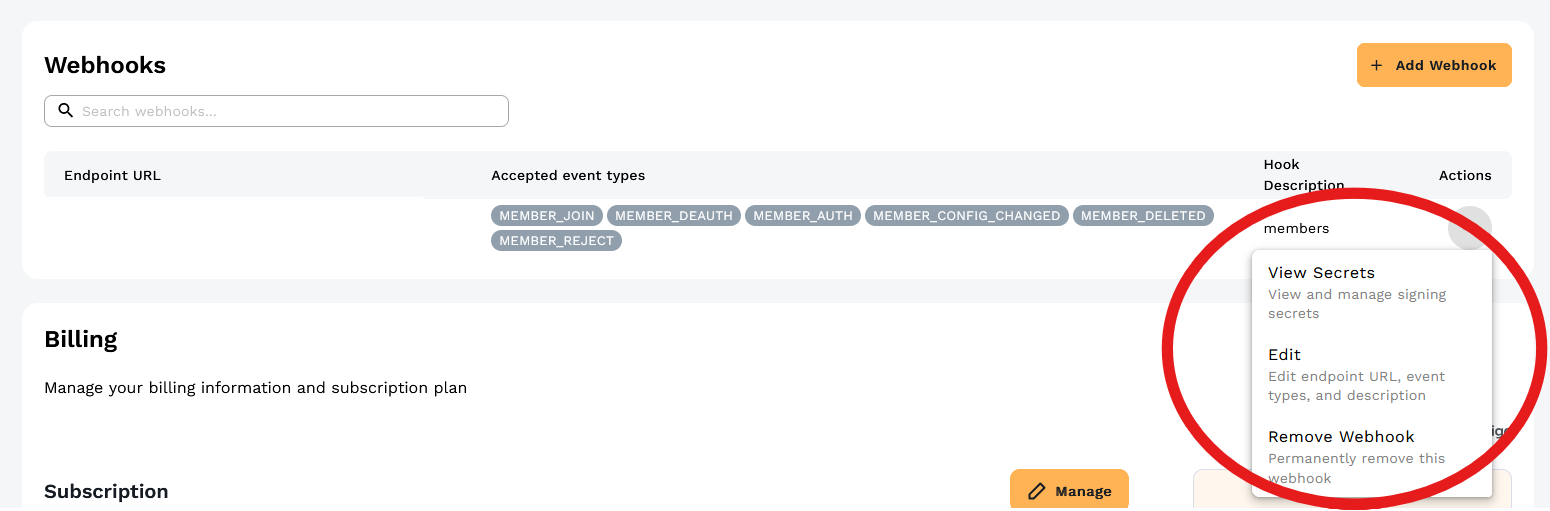
Your webhooks appear in the Webhooks table showing the endpoint URL, accepted event types, and description.

Click the Actions menu (⋯) to view secrets, edit the webhook, or remove it:
Webhook Payload Format
Webhooks are delivered as HTTPS POST requests to your configured endpoint.
Request Headers
Each webhook request includes standard HTTP headers plus the signature header for verification:
Content-Type: application/jsonContent-Length: <size>X-ZTC-Signature: <signature>- HMAC-SHA256 signature for verifying authenticity (see Webhook Security section below)
Request Body
The JSON request body contains the following fields:
{
    "webhookId": "...",
    "orgId": "...",
    "eventType": "...",
    "deliveryId": "...",
    "data": {
        "before": { ... },
        "after": { ... }
    }
}
- webhookId - The ID of the webhook that triggered this delivery
- orgId - The organization ID where the event occurred
- eventType - The type of event (e.g.,
MEMBER_AUTH,NETWORK_CREATED) - deliveryId - Unique ID for this specific webhook delivery attempt
- data - Event-specific payload containing
beforeandafterstates for change events
The data object structure varies by event type. For change events (like MEMBER_AUTH, NETWORK_CONFIG_CHANGED), it typically includes before and after objects showing the state before and after the change. See the New Central API Reference for complete payload schemas for each event type.
Event Types
Network Events
- Network Created (
NETWORK_CREATED) - Fired when a network is created - Network Config Changed (
NETWORK_CONFIG_CHANGED) - Fired when network configuration is modified - Network Deleted (
NETWORK_DELETED) - Fired when a network is deleted - Network IAM Changed (
NETWORK_IAM_CHANGED) - Fired when network access permissions are modified - Network Flow Rules Changed (
NETWORK_FLOWRULES_CHANGED) - Fired when flow rules are updated
Member Events
- Member Join (
MEMBER_JOIN) - Fired when a device requests to join a network - Member Auth (
MEMBER_AUTH) - Fired when a member is authorized to a network - Member Deauth (
MEMBER_DEAUTH) - Fired when a member's authorization is revoked - Member Config Changed (
MEMBER_CONFIG_CHANGED) - Fired when member configuration is modified - Member Deleted (
MEMBER_DELETED) - Fired when a member is removed from a network - Member Reject (
MEMBER_REJECT) - Fired when a member join request is rejected
Network Group Events
- Network Group Created (
NETWORK_GROUP_CREATED) - Fired when a network group is created - Network Group Config Changed (
NETWORK_GROUP_CONFIG_CHANGED) - Fired when network group settings are modified - Network Group Deleted (
NETWORK_GROUP_DELETED) - Fired when a network group is deleted - Network Group IAM Changed (
NETWORK_GROUP_IAM_CHANGED) - Fired when network group access permissions are modified
Organization Events
- Organization Created (
ORG_CREATED) - Fired when an organization is created - Organization Config Changed (
ORG_CONFIG_CHANGED) - Fired when organization settings are modified - Organization Deleted (
ORG_DELETED) - Fired when an organization is deleted - Organization IAM Changed (
ORG_IAM_CHANGED) - Fired when organization access permissions are modified
Service Account Events
- Service Account Created (
SERVICE_ACCOUNT_CREATED) - Fired when a service account is created - Service Account Config Changed (
SERVICE_ACCOUNT_CONFIG_CHANGED) - Fired when service account settings are modified - Service Account Deleted (
SERVICE_ACCOUNT_DELETED) - Fired when a service account is deleted
API Key Events
- API Key Created (
API_KEY_CREATED) - Fired when an API key is generated - API Key Config Changed (
API_KEY_CONFIG_CHANGED) - Fired when an API key is modified - API Key Deleted (
API_KEY_DELETED) - Fired when an API key is revoked
Webhook Events
- Webhook Created (
WEBHOOK_CREATED) - Fired when a webhook is created - Webhook Config Changed (
WEBHOOK_CONFIG_CHANGED) - Fired when webhook configuration is modified - Webhook Deleted (
WEBHOOK_DELETED) - Fired when a webhook is deleted - Webhook Secret Rotated (
WEBHOOK_SECRET_ROTATED) - Fired when a webhook signing secret is rotated - Webhook Secret Revoked (
WEBHOOK_SECRET_REVOKED) - Fired when a webhook signing secret is revoked
Delivery and Retries
Webhooks are delivered via HTTPS POST requests to your configured endpoint. If delivery fails, the webhook will be retried up to 10 times with exponential backoff. The first retry occurs approximately 1 minute after the initial failure, the second retry approximately 2 minutes after that, and so on up to a maximum of 1 hour between attempts. After 10 failed attempts, the delivery is abandoned.
Webhook Security
Webhook signing secrets verify that webhook requests are authentically from ZeroTier and haven't been tampered with. Each webhook delivery includes a cryptographic signature that you can validate using your secret.
How Webhook Signing Works
When ZeroTier sends a webhook to your endpoint:
- The entire webhook payload is signed using HMAC-SHA256 with your signing secret
- The signature is included in the
X-ZTC-SignatureHTTP header - Your application can verify the signature using the same secret to confirm the request is authentic
This prevents attackers from sending fake webhook requests to your endpoint.
Viewing Signing Secrets
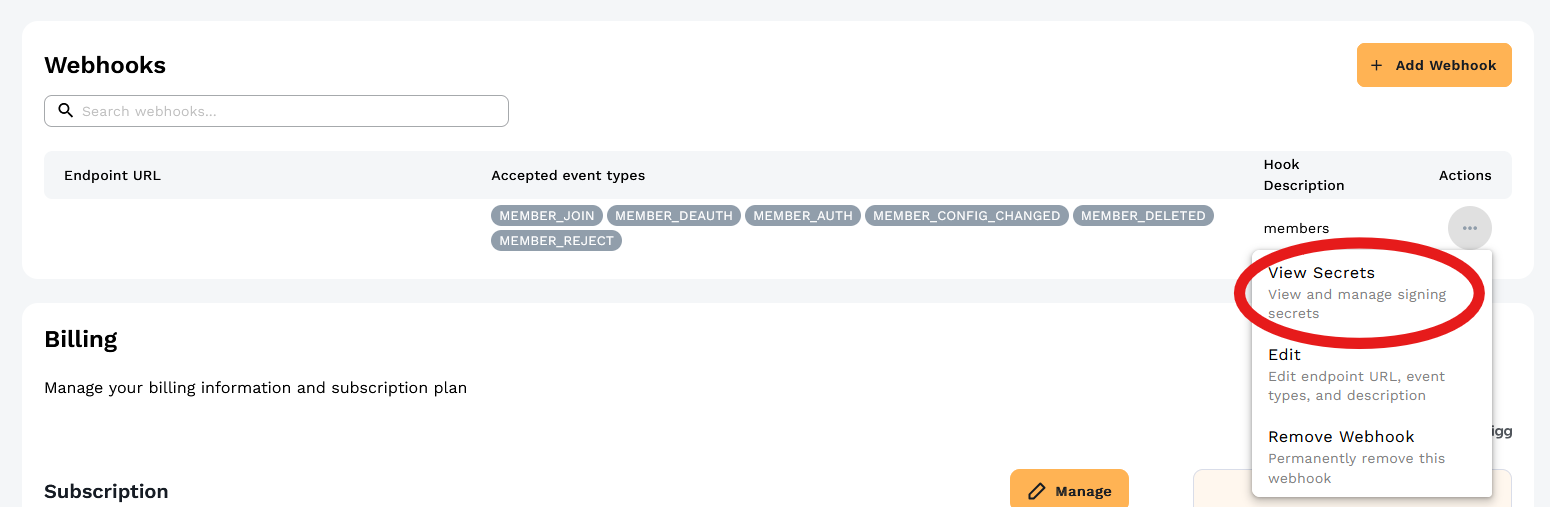
From the Actions menu for your webhook, select View Secrets:
The View Secrets dialog shows your signing secrets:
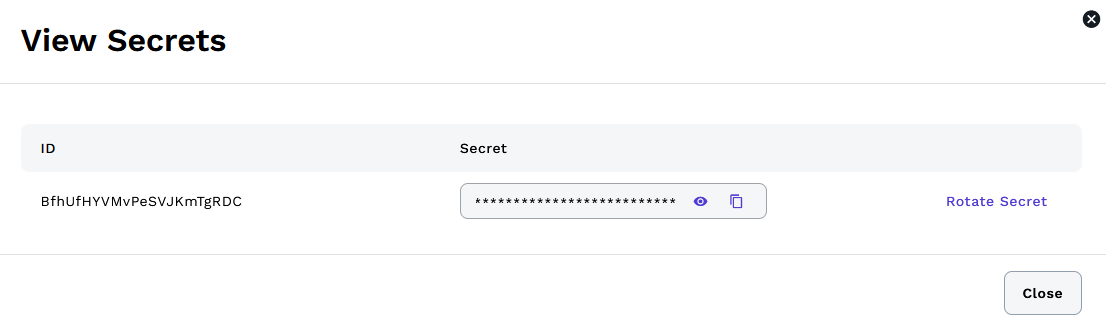
Each webhook has one or more signing secrets. Click the eye icon to reveal the secret value, then use the copy icon to copy it to your clipboard. The signing secret is a hexadecimal string that you'll use to verify incoming webhook requests. Store it securely in your application's configuration or secrets management system (such as AWS Secrets Manager, HashiCorp Vault, or environment variables).
Rotating Secrets
Click Rotate Secret to generate a new secret while keeping the old one valid during a configurable overlap period (default 24 hours). This allows you to:
- Generate a new secret
- Update your application to use the new secret
- Deploy the changes
- The old secret automatically expires after the overlap period
During the overlap window, webhooks are signed with both the new and old secrets, so your application can verify using either one. This ensures zero downtime during secret rotation.
If you need to rotate again before the overlap period expires, you must first revoke the existing overlap secret using the API. See the Rotate Webhook Secret API documentation for programmatic rotation with custom overlap periods.
Verifying Webhook Requests
Your application should verify every incoming webhook request:
- Extract the signature from the
X-ZTC-Signatureheader - Compute the HMAC-SHA256 signature of the request body using your secret
- Compare the computed signature with the received signature
- Only process the webhook if the signatures match
API Reference
For programmatic webhook management, see the New Central API Reference. The API allows you to create, update, delete, and list webhooks, as well as manage signing secrets.
Configuration
Go to the Account page. Under Your Organization there is a section called Webhooks.
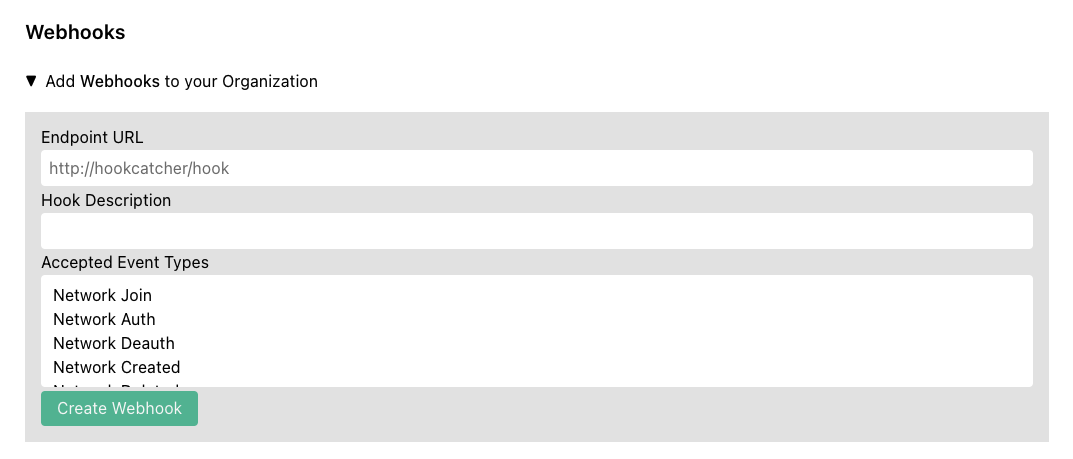
Enter the URL for your HTTP(S) endpoint that will receive the webhook and optionally enter a description. Select the event types you wish to receive on the webhook.
See github.com/zerotier/ztchooks for example code for receiving and processing webhooks.
Payload Format
All hooks fired will contain the following three fields:
{
    "hook_id": ...,
    "org_id": ...,
    "hook_type": ...,
}
The rest of the fields vary by hook_type. Full definitions of all fields can be found here.
Hook Types
-
Network Join (
NETWORK_JOIN) - Fired when a new member is requesting to join a network. This is only fired once when the network controller first receives the join request. -
Network Auth (
NETWORK_AUTH) - Fired when an administrator authorizes a new member to a network. -
Network Deauth (
NETWORK_DEAUTH) - Fired when an administrator revokes authorization from a network. -
Network Created (
NETWORK_CREATED) - Fired when an administrator creates a new network. -
Network Deleted (
NETWORK_DELETED) - Fired when an administrator deletes a network. -
Network Configuration Change (
NETWORK_CONFIG_CHANGED) - Fired when an administrator changes the configuration of a network. -
Network SSO Login (
NETWORK_SSO_LOGIN) - Fired when a user is authorized/reauthorized to a network via SSO. -
Network SSO Login Error (
NETWORK_SSO_LOGIN_ERROR) - Fired when there is an error authorizing/reauthorizing to a network via SSO. -
Member Configuration Change (
MEMBER_CONFIG_CHANGED) - Fired when an administrator makes a configuration change to a network member. -
Member Deleted (
MEMBER_DELETED) - Fired when an administrator deletes a network member. -
Organization Invite Sent (
ORG_INVITE_SENT) - Fired when the account owner invites an administrator to the network. -
Organization Invite Accepted (
ORG_INVITE_ACCEPTED) - Fired when the invitee accepts and joins the organization. -
Organization Invite Rejected (
ORG_INVITE_REJECTED) - Fired when the invitee rejects the invitation. -
Organization Member Removed (
ORG_MEMBER_REMOVED) - Fired when the account owner removes a member from the organization.
Retries
If a hook fails to be sent for any reason, it will be retried up to a maximum of 10 times with an exponential backoff policy. The 2nd attempt will be approximately 1 minute after the first, the third approximately 2 minutes after the 2nd, and so on to a maximum of 1 hour between attempts. If there is still a failure after 10 attempts, the call will be abandoned.
Security
To enhance security and prevent replay attacks, we have implemented a hook signing algorithm so you can verify each hook request as you receive it. We have also provided a Go Library and a TypeScript Library for verifying incoming webhooks.
Creating a Webhook Signing Secret
Create a Webhook Signing Secret from your account page:
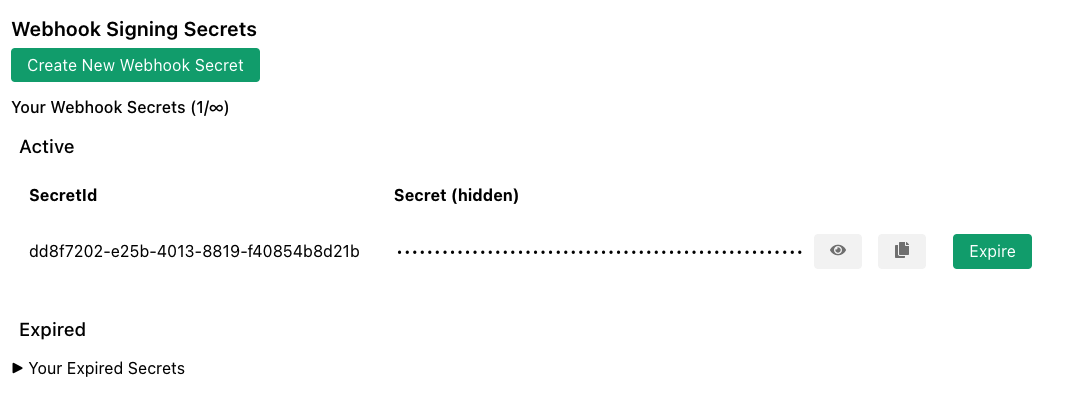
The secret is a hexadecimal string. You will need a copy to verify webhooks. The signature will be placed in the HTTP header X-ZTC-Signature.
Go Example
import (
    "net/http"
    "github.com/zerotier/ztchooks"
)

const PSK = "<your_signing_secret>"

func hookCatcher(res http.ResponseWriter, req *http.Request) {
    body, err := io.ReadAll(req.Body)
    if err != nil {
        panic(err)
    }

    signature := req.Header.Get("X-ZTC-Signature")
    if err := ztchooks.VerifyHookSignature(PSK, signature, body, ztchooks.DefaultTolerance); err != nil {
        // signature verification failed
        res.WriteHeader(http.StatusInternalServerError)
        w.Write([]byte("500 - Signature Verification Failed"))
        return
    }

    // Signature verification succeeded
}

func main() {
    http.HandleFunc("/", hookCatcher)
    http.ListenAndServe(":9999", nil)
}
A more complete example of verification and processing hooks can be found here.
It is possible to have multiple signing secrets. Hooks will be signed with all secrets, and the verification method provided by the ztchooks library takes this into account automatically.